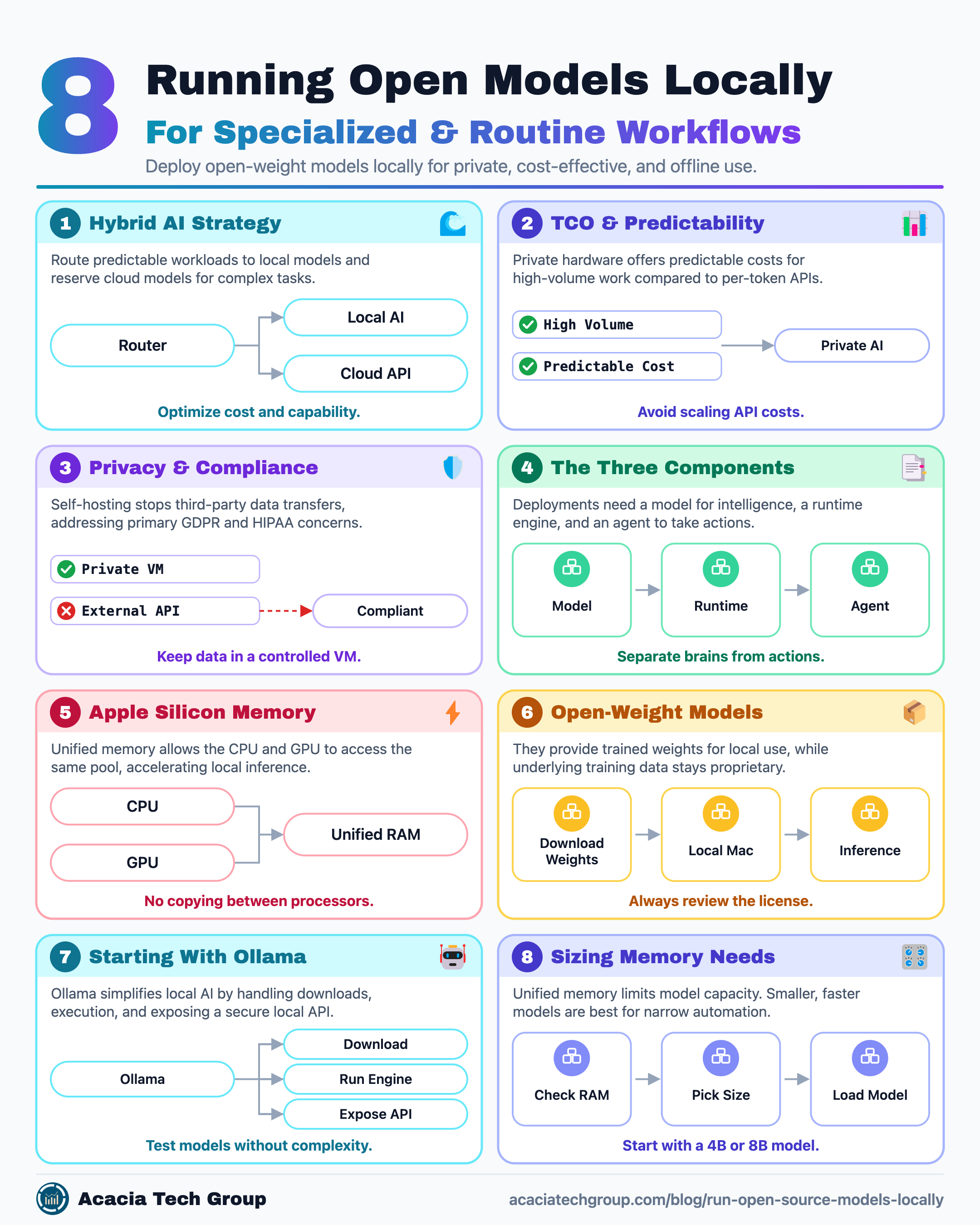
Part 5: Running Open Models Locally for Specialized Tasks cheat sheet.
Part 5: Running Open Models Locally for Specialized Tasks
Cloud AI tools such as Claude, ChatGPT, and Copilot are extremely useful because they combine capable models with polished applications, tools, and infrastructure.
But not every task needs a frontier cloud model.
Many personal and business workflows are repetitive, narrow, and predictable:
classifying email
summarizing routine messages
identifying newsletters or low-priority mail
organizing files
renaming documents
extracting information from PDFs
categorizing notes
reviewing logs
generating metadata
sorting downloads
preparing drafts
running simple local automations
These are exactly the kinds of workloads where a small open-weight model running locally becomes a high-value asset. Running models locally provides significant privacy, offline capability, and cost advantages for predictable tasks.
A 2026 cost analysis suggests local AI deployment can save $300 to $500 per month in API fees after an initial hardware investment. For heavy workloads, this shift becomes a sustainable business decision, as the performance gap between local open-weight models and frontier cloud APIs has narrowed for tasks like classification and RAG.
Recent 2026 benchmarks illustrate the TCO benefits of this shift. While Gemini 2.5 Flash costs $0.003 per 38-token run, high-volume production teams running millions of daily tokens often find private GPU instances more predictable than per-token billing. A private instance running models like Qwen3 or GPT-oss can be significantly cheaper at scale, provided the break-even point accounts for utilization and maintenance. Beyond cost, local models are ideal for specialized tasks such as finance or industry-specific prose writing.
Instead of sending every request to a hosted model and consuming API tokens, we can run open-source models locally directly on a Mac and reserve larger cloud models for work that genuinely needs them.
The goal is not to replace Claude, GPT, or another hosted model entirely.
A better strategy is:
Routine / private / high-volume work
               ↓
        Local AI model

Complex reasoning / difficult decisions
               ↓
        Cloud AI model
This creates a practical hybrid AI architecture.
Start With the Right Mental Model
It is important to separate three components:
Model
  ↓
Runtime
  ↓
Agent / Automation
The model provides the intelligence.
Examples of open-weight models include:
Qwen3 / Qwen3.6
Llama 4 Scout
Gemma 3
Phi-4
Mistral
The runtime is the software that loads and runs the model on your computer.
Popular options for Apple Silicon AI include:
Ollama
LM Studio (includes hardware compatibility detection)
GPT4All (privacy-focused with high adoption)
llama.cpp or llamafile
The agent or automation layer lets the model do useful work.
For example:
Local Qwen model
       ↓
Python script
       ↓
Gmail API
       ↓
Classify messages
       ↓
Apply labels
The Qwen model itself does not know how to move an email into a Gmail label.
It might decide:
This message looks like a receipt.
But something else must actually call Gmail and apply the Receipts label.
That "something else" is the automation or agent layer.
In real-world, security-conscious environments, organizations deploy open models within private virtual machines to handle sensitive customer information. This keeps data within a controlled environment and prevents it from reaching proprietary cloud providers, maintaining high security while still leveraging modern LLM capabilities.
Beyond basic privacy, self-hosting is a prerequisite for highly regulated industries. The ability to run open source models locally solves primary GDPR and HIPAA concerns by eliminating third-party data transfers. However, while the infrastructure enables compliance, organizations must still implement internal access controls, encryption, and audit logging to complete their compliance framework.
Why a Mac Is a Good Platform for Local AI
Modern Apple Silicon Macs are surprisingly capable local inference machines for those who want to run open-source models locally.
Apple uses a unified memory architecture, where the CPU and GPU can access the same memory pool. This unified-memory AI advantage is especially useful for large models because weights don't have to be repeatedly copied between separate CPU and GPU memory spaces.
Apple created the MLX framework specifically for Apple Silicon AI, and projects such as Ollama and llama.cpp take advantage of Apple's hardware acceleration.
Conceptually:
Apple Silicon Mac
        ↓
 Unified Memory
        ↓
 CPU + GPU
        ↓
 Local Model
This does not mean a Mac replaces a data center GPU cluster.
It does mean that reasonably sized models can run locally without requiring a dedicated NVIDIA server. When you choose to run open source models locally on a Mac, you leverage unified memory AI with high-bandwidth access that rivals entry-level workstation GPUs.
For users without a high-end GPU, small variants like Gemma 3 1B/4B, Phi-4-mini, or Qwen3 small can run on a CPU, though generation speed will be reduced.
Open Source vs. Open Weight
The term open-source model is common, but open-weight model is often more precise. Valid open-weight models make their trained weights available for download and local use, though the underlying training data and code may remain proprietary.
Examples include many releases from:
Qwen
Meta Llama
Google Gemma
Mistral
DeepSeek R1
Licensing differs between model families, so always review the license before using a model commercially. The decision to run open source models locally should always be preceded by a compliance check of the specific model license.
The benchmark tells you how the model performs. The license tells you whether you can rely on it in a real project.
The important difference from a hosted model is:
Hosted model

Your request
    ↓
Internet
    ↓
Provider infrastructure
    ↓
Model
versus:
Local open-weight model

Your request
    ↓
Your Mac
    ↓
Local model
Once you download the model, you can run inference locally.
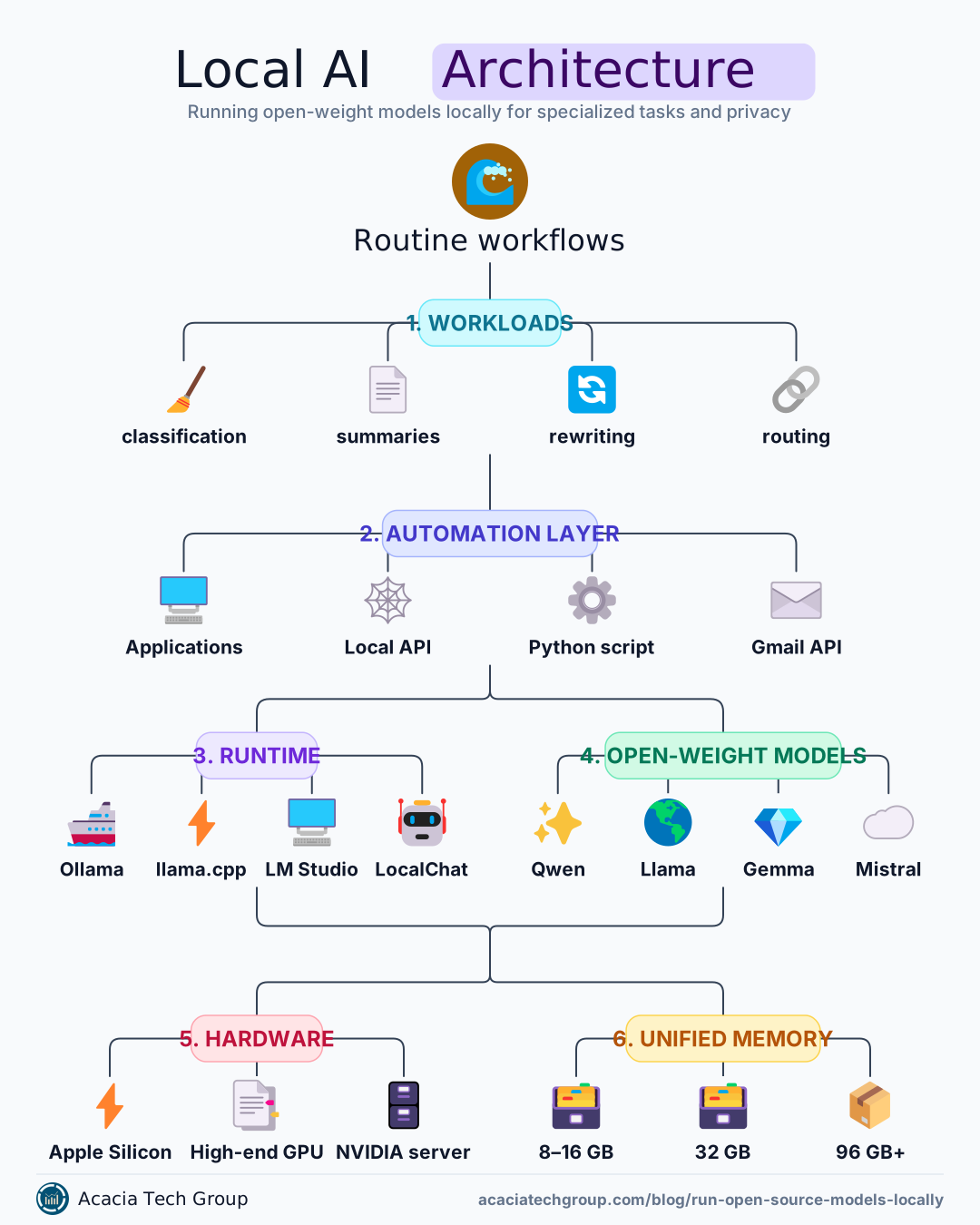
Part 5: Running Open Models Locally for Specialized Tasks cheat sheet.
The Easiest Starting Point: Ollama
For those new to local AI, Ollama is one of the simplest entry points to run open-source models locally. When evaluating Ollama vs llama.cpp, Ollama gives developers and executives a streamlined way to test models without complex configuration.
It handles much of the complexity involved in:
downloading and updating models (via
pull)storing them
starting the inference engine
exposing a local API on
localhost:11434switching between models
The basic experience looks like:
ollama run qwen3:4b
Ollama downloads the model and starts a local chat session.
Behind the scenes:
Terminal
   ↓
Ollama
   ↓
Qwen3 4B
   ↓
Apple Silicon
Applications can also call Ollama through a local API. That makes the local model look much like a hosted AI API, except the request stays on your computer. With tools like this, the barrier to run open source models locally has never been lower.
Ollama's optimization for Apple Silicon AI leverages unified memory AI to improve local inference performance. It defaults to localhost:11434allowing local applications to communicate with the model securely without an internet connection.
Choosing a Model for a Mac
The biggest constraint is usually memory.
Model size and quantization determine how much unified memory AI capacity is required.
As a rough planning guide:
Mac Unified Memory | Practical Starting Point |
|---|---|
8–16 GB | 1B–4B models, some 7B/8B models with aggressive quantization |
16–24 GB | 4B–8B models comfortably; some larger quantized models |
32 GB | 7B–14B models are practical for many workloads |
48–64 GB | 14B–32B class models become much more realistic |
96 GB+ | Larger models become possible, depending on context and quantization |
These are guidelines, not hard limits.
The model's context window, quantization, runtime overhead, and other memory-intensive applications also matter when you run open source models locally.
Latest Memory Benchmarks
By mid-2026, Mixture of Experts (MoE) architectures have become significantly more efficient. For instance, a Qwen3 30B-A3B model activates only 3B parameters per token, reaching roughly 100 tokens per second on a single high-end GPU while using only about 20 GB of memory.
Surveying the 2026 landscape, Gemma 4 31B ranked #3 among all open-weight models on the Arena AI text leaderboard, scoring 89.2% on AIME 2026 math benchmarks. This shows local models are no longer just for simple tasks; they're increasingly competitive with frontier APIs.
For a first local automation project, smaller is usually better. A fine-tuned 7B model often outperforms a generic 70B model on specific tasks. A smaller, faster model is often more useful than a giant model that causes memory swapping or slow response times.
Some Useful Local Model Candidates
For narrow personal automation, there is little reason to begin with a 70B or 200B parameter model.
Qwen3 4B or 8B
Good starting point for:
classification
summaries
structured extraction
rewriting
routing
light reasoning
tool selection
Example:
ollama run qwen3:4b
or:
ollama run qwen3:8b
Qwen3 also supports tool use and agent-oriented workflows, which can help when building automation around the model.
As of June 2026, the Qwen3 3.6 27B model has shown strong proficiency in technical tasks, scoring 77.2% on SWE-bench Verified. This places it near the top tier of local coding models for those with sufficient unified memory.
In practice, companies use these models to process large volumes of unstructured CRM data. One documented example involves training models on thousands of customer notes so employees can ask questions directly, bypassing the need to review hundreds of individual records manually.
Gemma 3 or Phi-4
Google's Gemma and Microsoft's Phi families are excellent lightweight alternatives for local inference. For machines with limited resources, Phi-4-mini is a top recommendation for maintaining performance on older hardware, while Gemma 3 4B offers high MMLU scores for its size.
They can work well for:
summarization
classification
general text processing
personal assistants
Compare them against Qwen on your own tasks rather than choosing based only on public benchmarks. Testing these as you run open source models locally will reveal which architecture suits your specific prose or data style.
For RAG-specific tasks, pairing these open-weight models with local embedding tools like nomic-embed-text allows for private, local semantic search.
Llama 3.3 70B or DeepSeek R1
On a Mac with high unified memory (64GB+), larger models like Llama 3.3 70B or DeepSeek R1 offer reasoning capabilities that rival frontier cloud APIs. These are suitable for complex technical tasks and high-precision reasoning that small models might struggle with.
Qwen Coder or Other Coding Models
If the workload is primarily:
reviewing code
creating scripts
debugging
editing configuration
automating shell tasks
then a coding-specialized model may perform better than a general-purpose model.
The principle remains:
Choose the model for the workload, not because it has the largest parameter count.
Common Local Pitfalls
While the decision to run open source models locally offers significant advantages, several practical challenges arise when you move beyond basic chat sessions.
Over-Reliance on General Frontier Models: The most expensive mistake in hybrid architectures is using frontier cloud models for high-volume, narrow tasks. A fine-tuned 7B model can often match or exceed frontier performance on specific classification tasks at a fraction of the cost.
Training Bias and Error Reproduction: Local models may reliably reproduce common errors found in their training data. For example, coding models trained on public repositories may suggest flawed boilerplate or outdated patterns because they have been "trained" on those common mistakes.
Context and "Working Memory" Limits: Local models typically have smaller effective context windows than cloud counterparts. They often struggle with tasks that require holding multiple pieces of information in working memory, which can lead to missed details when summarizing very long documents or modules.
PII Leakage in Local Logs: Privacy is a primary driver for local AI, but it is not automatic. If users paste sensitive information into prompts, that data may persist in local inference logs or cached outputs unless you implement specific input filtering and data-handling policies.
Treating Models as Interchangeable: A model that excels at text classification may be poor at structured JSON extraction. In the Ollama vs llama.cpp debate, remember to benchmark each model on the specific task type you intend to automate rather than relying solely on general leaderboard scores.
Training bias: Models may reliably reproduce common errors from their training data, such as flawed C code or mistakes from beginner tutorials.
Multimodal and RAG constraints: While local models now support 1080p vision and RAG (using tools like
nomic-embed-text), they require carefully managed pipelines to maintain semantic accuracy without reaching context limits.PII leakage: If users paste sensitive information into prompts, that data may persist in local logs or cached outputs unless specific input filtering is implemented.
The Complete AI Foundations Series
Part 5: Running Open Models Locally for Specialized Tasks (you are here)
Part 6: Local AI in Practice: Email, Files and Document Automation
Part 7: The Hybrid Strategy: When to Stay Local and When to Go Cloud
Further reading
Best Open-Source LLMs in 2026 — A technical breakdown of GLM-5.2 and Kimi K2.7 performance for coding agents.
How to Run Local LLMs with Claude Code — Official documentation on connecting open-weight models like Qwen3.6 to agentic workflows.
How to Run an Open-Source LLM — A deep dive into model management apps and command-line installation methods to run open source models locally.