Part 6: Local AI in Practice: Email, Files and Document Automation
This is Part 6 of our beginner series on AI models and agents. In Part 5, we set up local models with Ollama; now we put them to work using local AI automation. Catch up: Part 1: What Is an AI Model?, Part 2: What Is an AI Agent?, Part 3: Understanding AI Model Configurations, and Part 4: Choosing the Right Model and Agent.
Scenario 1: Sorting Email Locally
Email is a good example of how local AI automation can simplify repetitive tasks.
Suppose the goal is to use email classification AI to sort incoming messages into:
Important
Recruiting
Financial
Receipts
Newsletters
Personal
Low Priority
A local architecture could look like:
Gmail
  ↓
Gmail API
  ↓
Python automation
  ↓
Local Qwen model
  ↓
Classification
  ↓
Python automation
  ↓
Apply Gmail label
Notice the model is only responsible for:
Message
   ↓
"Recruiting"
It does not need access to your entire Gmail account.
The automation can send the model only the information it needs:
Sender
Subject
Small message excerpt
This improves both privacy and performance.
The demand for these workflows is already high in the workplace. According to AIPRM research, 78.5% of people use AI for email spam filters, and another study found that 45% of consumers use AI specifically to respond to texts or emails. Local automation lets these high-frequency tasks run without the privacy risks of processing personal communication in the public Cloud.
Implementing these systems locally helps teams reclaim significant bandwidth. According to recent research from Icumulus.AI, sales professionals save 2 hours and 15 minutes daily by using AI for tasks like data entry and note-taking. A 2026 global report also indicates that back-office finance operations can achieve an average 70% reduction in processing costs through this kind of automation.
Start Email Automation in Read-Only Mode
I wouldn't start by letting an AI system automatically delete, archive, or send email.
Start with:
READ
 ↓
CLASSIFY
 ↓
RECOMMEND
For example:
{
  "category": "Recruiting",
  "priority": "High",
  "suggested_action": "Reply"
}
Once the classification proves reliable, move to:
READ
 ↓
CLASSIFY
 ↓
APPLY LABEL
Only after extensive testing should you consider:
Archive
Move
Delete
Send
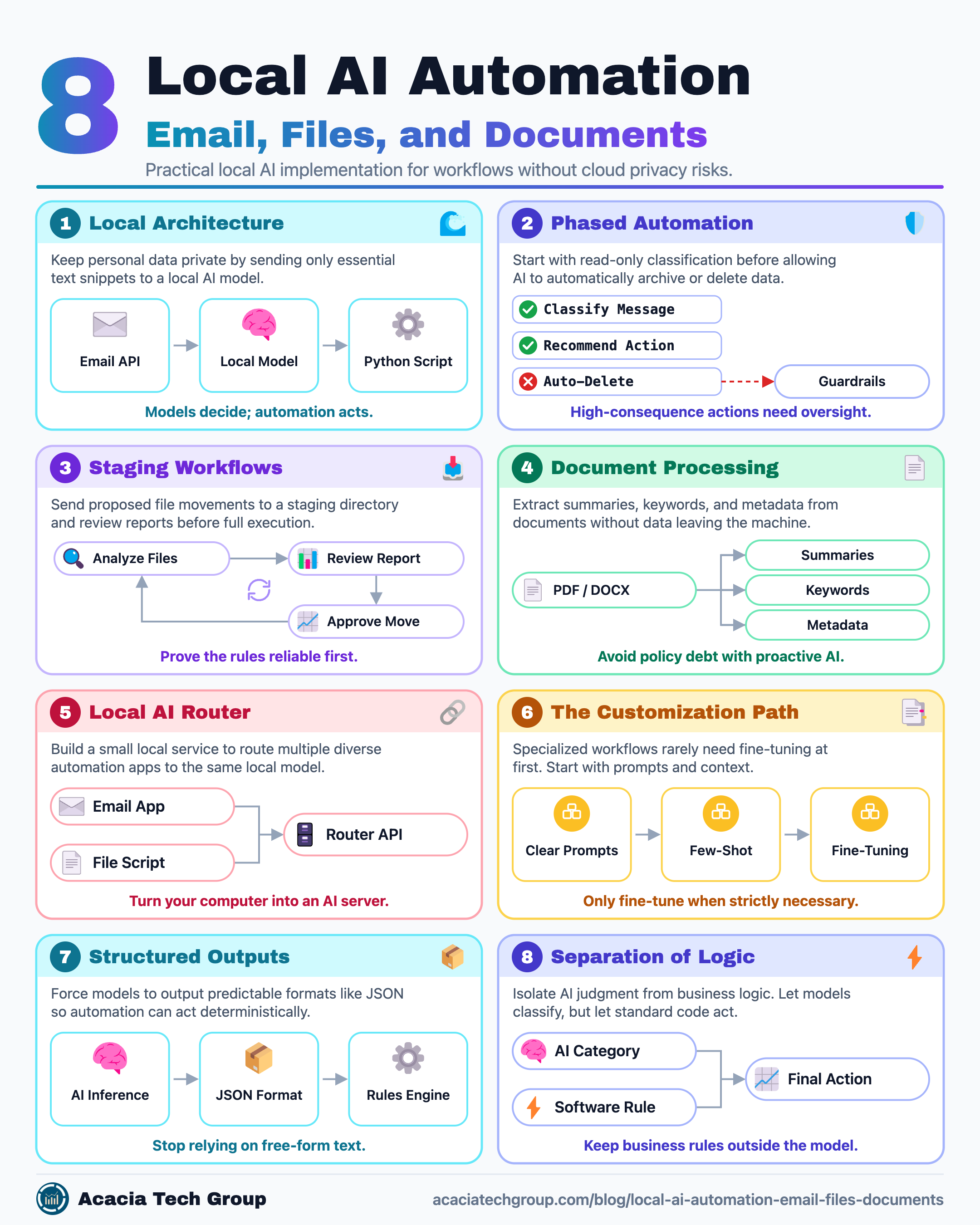
Actions with meaningful consequences should have stronger AI guardrails or human approval.
Scenario 2: Cleaning Up the Downloads Folder
A local model can also help organize files.
Imagine a Downloads directory containing:
IMG_3827.pdf
document(14).pdf
invoice_final2.pdf
resume-new.docx
Screenshot 2026-09-01.png
unknown-file.txt
A workflow could be:
Downloads folder
       ↓
Python script
       ↓
Read filename / metadata / selected content
       ↓
Local model
       ↓
Classify file
       ↓
Automation
       ↓
Rename and move file
The local model might return:
{
  "category": "Finance",
  "document_type": "Invoice",
  "suggested_name": "2026-09_Acme_Invoice.pdf",
  "destination": "Documents/Finance/Invoices"
}
The automation performs the file operation.
Again:
The model decides. The automation acts.
Use a Staging Folder Before Moving Files
A safe first implementation of local AI automation is:
Downloads
    ↓
Analyze
    ↓
Proposed changes
    ↓
Review
    ↓
Staging folder
Instead of immediately moving files across the computer.
You could generate a report such as:
Current File               Proposed Location
---------------------------------------------------------
invoice_final2.pdf       → Finance/Invoices/
resume-new.docx          → Career/Resume/
IMG_3827.pdf             → Documents/Unclassified/
Then approve the changes.
Once you've proven the rules reliable, you can automate more actions.
Scenario 3: Local Document Processing
Another strong local use case is document processing before sending data anywhere else.
For example:
PDF / DOCX
    ↓
Extract text
    ↓
Local model
    ↓
Summary
Keywords
Classification
Metadata
This is useful for:
contracts
resumes
reports
research papers
invoices
project documents
meeting notes
A local model might create:
{
  "document_type": "Resume",
  "person": "John Smith",
  "skills": ["Python", "Azure", "Databricks"],
  "category": "Candidate",
  "summary": "Senior data engineer..."
}
The structured result can then feed another application.
Large-scale implementations demonstrate the massive efficiency gains possible through automated screening. For instance, Unilever reported saving 100,000 hours of recruitment time in a single year by using software to analyze video interviews and triage candidates. By moving such tasks to local models, organizations can achieve similar throughput while ensuring that sensitive applicant data never leaves their internal infrastructure.
Real-world implementation often involves identifying gaps in high-risk documentation. In one example reported by Glean, specialized AI platforms identify outdated policy documents and suggest real-time updates. This proactive approach helps organizations avoid "policy debt" by keeping documentation in step with structural changes or new technology implementations.
Scenario 4: A Personal Local AI Router
Eventually, instead of writing separate applications for every workflow, we can build a small local AI service.
                    Local AI Router
                         ↓
             ┌───────────┼───────────┐
             ↓           ↓           ↓
           Email       Files      Documents
             ↓           ↓           ↓
        Classify      Organize     Summarize
The router might expose a simple API:
POST /classify-email
POST /classify-file
POST /summarize-document
POST /extract-metadata
All of these requests can use the same local model.
This turns the Mac into a small personal AI server.
When setting up this local router, developers must account for container networking. A common pitfall when running tools like n8n in Docker is forgetting to set OLLAMA_HOST to 0.0.0.0; by default, the local model service may only bind to localhost, preventing the automation tool from reaching the AI model.
Do I Need to Fine-Tune the Model?
Probably not at first.
Many specialized workflows can be built using:
General instruct model
        +
Clear prompt
        +
Structured output
        +
Examples
For example:
Classify the email into exactly one of:

- Recruiting
- Financial
- Personal
- Newsletter
- Receipt
- Other

Return JSON only.
That may be enough.
The progression should usually be:
Prompting
   ↓
Few-shot examples
   ↓
RAG / additional context
   ↓
Fine-tuning only if necessary
Fine-tuning becomes useful when you have:
many high-quality examples
a stable task
consistent output requirements
measurable gains from customization
Do not start with fine-tuning just because the workload is specialized.
Give the Model Structured Outputs
Local AI automation becomes much easier when the model produces structured outputs in predictable data formats.
Instead of:
"This looks like an important recruiting message."
ask for:
{
  "category": "Recruiting",
  "priority": 5,
  "action": "Review",
  "confidence": 0.94
}
Your code can then make deterministic decisions.
Model
  ↓
JSON
  ↓
Rules
  ↓
Action
This is much safer than letting free-form text directly control the computer.
While structured outputs provide reliability, the shift toward predictive document automation represents the latest advancement for 2026. Rather than just reacting to an arrival, modern AI agents are now expected to reason across systems and justify their decisions. This specialization is increasingly driven by fragmenting global regulatory frameworks, which require systems to understand the specific rules governing how data must be stored and acted upon.
Despite these advancements, reliability varies by task type. While BERT-based document systems can achieve 94.5% accuracy in regulatory analysis, even sophisticated legal research tools may still produce incorrect information 17-34% of the time. This underscores the need for a human-in-the-loop to evaluate AI-generated recommendations for organizational fit.
Keep Business Rules Outside the Model
A strong architecture separates:
AI judgment
from:
deterministic rules
For example, let the model decide:
category = "Financial"
But let normal software decide:
if category == "Financial":
    destination = "Finance"
Do not ask the model to reinvent deterministic business rules on every request.
This creates systems that are:
easier to test
easier to explain
easier to audit
cheaper
more reliable
When budgeting for these systems, organizations should distinguish between local infrastructure and commercial alternatives. As of June 2026, automation benchmarks show that Microsoft Power Automate starts at $15/user/month, while enterprise-tier platforms like UiPath often require low-six-figure annual minimums. In contrast, local tools like n8n remain free for self-hosted use, offering a significant TCO advantage for businesses willing to manage their own hardware and data privacy.
For companies evaluating external help, AI automation agency pricing in 2026 typically ranges from $1,500 to $12,000 for one-time builds. For larger enterprises, consulting projects often fall between $200,000 and $999,999, depending on compliance depth and integration complexity.
A Safe Architecture for Personal Automation
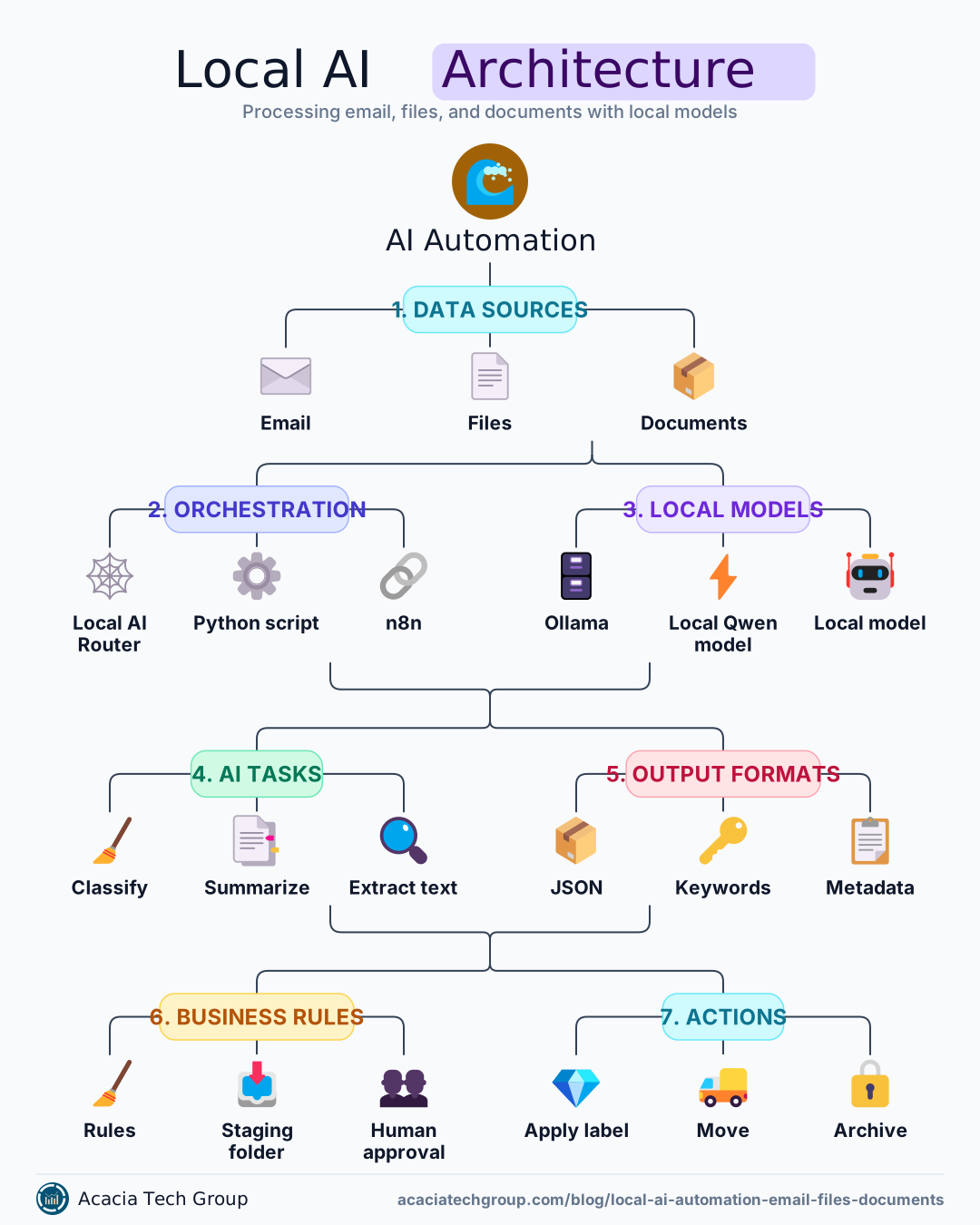
A practical architecture for local AI automation could look like:
             Gmail / Files
                  ↓
             Read-only API
                  ↓
            Local Automation
                  ↓
              Ollama API
                  ↓
             Qwen / Gemma
                  ↓
           Structured JSON
                  ↓
             Rules Engine
                  ↓
         Proposed Actions
                  ↓
            Human Approval
                  ↓
              Execute
Over time, low-risk actions can become automatic.
High-risk actions remain behind approval.
From a compliance perspective, local setups address the "data residency" issue inherent in cloud models. Because local automation ensures no data leaves the organization, it is often mandatory for industries handling sensitive customer information in finance, healthcare, or legal sectors.
Frequently Asked Questions
Is it safe to let a local AI model sort my email?
Yes, if you start in read-only mode using email classification AI. Let the model read and classify messages and recommend labels first, then let it apply labels only after its classifications prove reliable. Keep actions like archiving, deleting, or sending behind human approval or strong AI guardrails.
Why use a staging folder before moving files?
A staging folder lets the local AI automation propose renames and moves without touching your real files. You review a report of proposed changes, approve them, and only then does the system act — a safe way to build trust in the model's decisions before automating them.
Do I need to fine-tune a model for these tasks?
Usually not. A general instruct model with a clear prompt, structured outputs, and a few examples handles most classification and extraction tasks. Fine-tuning only becomes worthwhile when you have many high-quality examples, a stable task, and measurable gains from customization.
Why keep business rules outside the model?
The model should supply judgment — for example, deciding a file is a financial document — while ordinary code applies deterministic rules, such as where financial documents go. This makes the system easier to test, explain, audit, and operate, and avoids paying the model to reinvent fixed rules on every request.
The Complete AI Foundations Series
Part 6: Local AI in Practice — Email, Files and Document Automation (you are here)
Part 7: The Hybrid Strategy — When to Stay Local and When to Go Cloud
Go deeper: the AI agents glossary entry, the Azure AI agents demo, and our comparison of data lakehouse vs. data warehouse for the platform these systems run on.
Further reading
Local AI Models for Automation: The Complete Setup Guide — Detailed technical steps for achieving zero-token fees and full data control.
The Complete Guide to Local AI Automation and Privacy — An exploration of the operational benefits and architecture required for enterprise-grade on-premises workflows.
Local AI Automation Suite Guide — A comprehensive implementation document for running local agents and models.
LocalAI Package Documentation — Technical reference for running quantized Small Language Models on local devices for task classification.
Local AI Models for Automation Guide — A deep dive into eliminating per-token fees and ensuring offline reliability.
UiPath: Simplifying Email Automation — Insights into retraining models using human-validated exceptions.