From One Agent to a Coordinated System: A Helpdesk Escalation Build
Most AI agent demos stop at conversation. The hard part starts when an agent has to act inside systems it was never built for, and hand off work to other agents without losing the thread. To address this, I implemented enterprise ai agent orchestration to bridge the gap between chat and action.
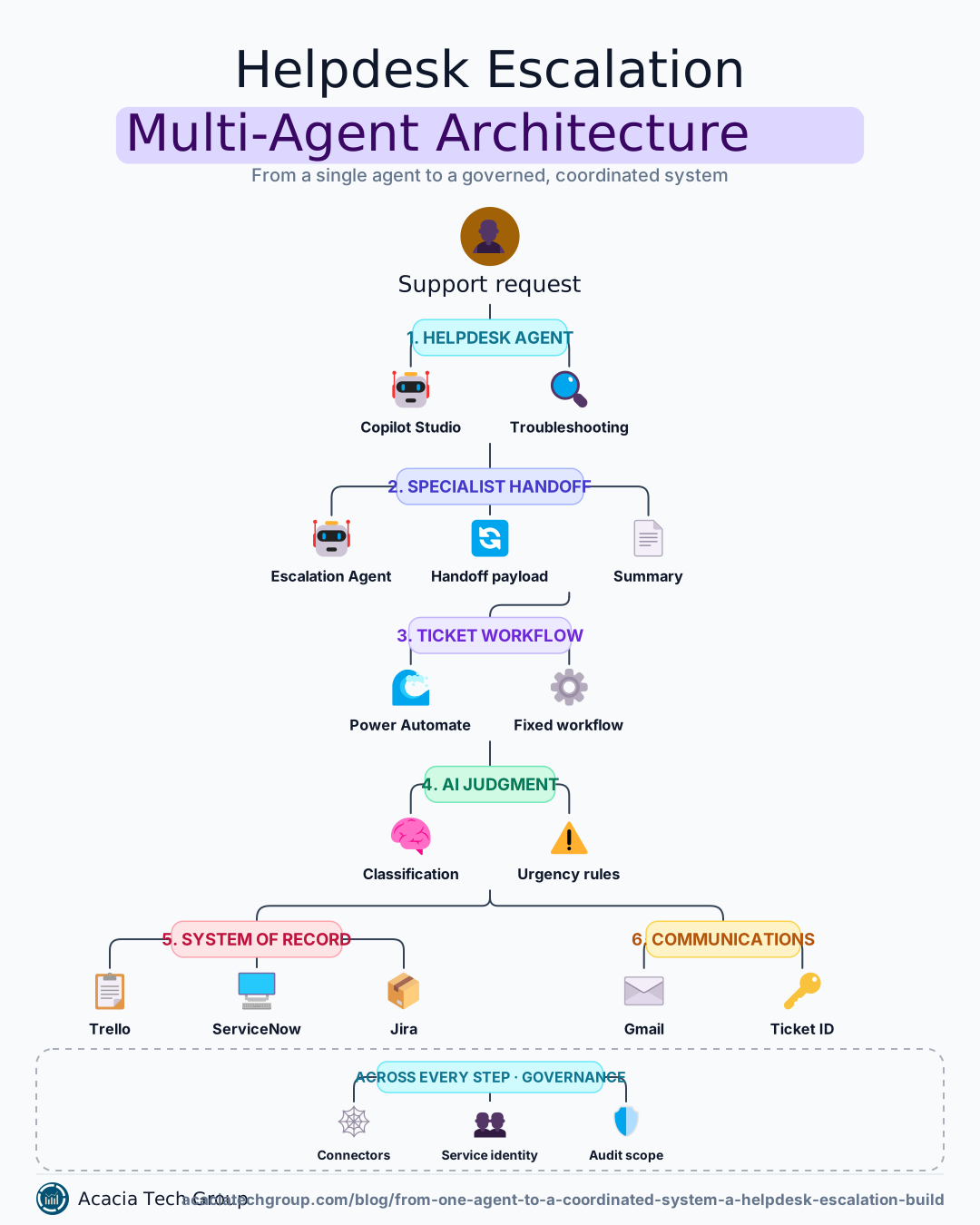
I built a helpdesk escalation system in two stages to work through those problems in practice. It started as one agent that could open a ticket. It became two cooperating agents and a governed workflow that classifies urgency and returns a ticket ID. I built it during my graduate coursework in enterprise ai agent orchestration, using microsoft copilot studio automation, Power Automate, Trello, and Gmail.
Tooling and integration stack
The system was built using four primary components, chosen to represent a standard enterprise automation stack:
Microsoft Copilot Studio: Used to build the helpdesk and specialist agents, providing the reasoning layer and conversational interface for these it support ai agents.
Power Automate: Serves as the orchestration layer, executing the deterministic ticket-creation workflow that connects the agents to external systems.
Trello: Acts as the system of record for incident tracking, simulating a dedicated ITSM tool like ServiceNow or Jira Service Management (Research 1).
Gmail: Handles automated user communications, ensuring the responder receives a notification through a configured channel (Research 1).
This post walks through both stages and the five design decisions that mattered most. While microsoft copilot studio automation was the specific tool used, the architectural choices apply to any enterprise agent platform.
Stage 1: One agent that can act
Stage 1 gave a single helpdesk agent one consequential ability: opening a support ticket when self-service fails. The scenario is a password reset, the most common helpdesk request.
The conversation is short by design:
The agent asks whether the user already tried the self-service reset link.
If not, it gives the self-service steps and ends.
If they tried and it failed, it collects their email and the affected application.
It writes a short summary of the problem from those answers.
It calls a workflow with two inputs: the summary and the email.
The workflow creates a card in the ticketing board (Trello) and emails the user a confirmation (Gmail).
The agent never touches Trello or Gmail directly. It decides when a ticket is needed and what it should say. The workflow does the writing, the same way every time.
That split is the first real architecture decision in the build, and it comes back below.
Stage 2: Splitting out a specialist
Stage 2 moved ticket creation out of the helpdesk agent and into a dedicated Escalation Agent, demonstrating a more robust multi-agent workflow design. The helpdesk agent now troubleshoots; when that fails, it hands the case to the specialist.
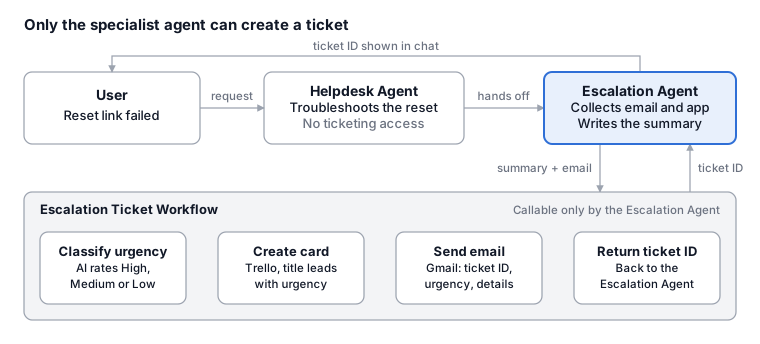
In this configuration, the helpdesk agent hands unresolved cases to the Escalation Agent. The Escalation Agent is the only caller in the ticket workflow; it classifies urgency, creates the Trello card, and sends the Gmail confirmation. The workflow then returns a ticket ID that flows back through the agents to the user in the chat.
The Escalation Agent owns one job. It confirms the user's email and application, writes a plain-text summary, and calls the workflow. The workflow also grew:
An AI classification step rates urgency as High, Medium, or Low from the summary.
The Trello card title leads with that urgency, so the queue sorts itself at a glance.
The confirmation email includes the ticket ID, urgency, and ticket details.
The workflow returns the ticket ID to the agent, who shares it with the user in chat.
The ticket workflow is restricted to the specialist. No other topic or agent can call it, and the helpdesk agent no longer holds ticketing access at all.
Why split at all
Splitting agents is not free, so the reason has to be specific. Three pressures drove this multi-agent workflow design:
Instruction dilution. Troubleshooting and ticket-writing instructions compete in one agent. Each gets done worse as the other grows.
Permission collision. An agent that does everything needs every permission. Isolating write access in one small agent shrinks the attack surface and the audit scope.
Change coupling. Ticket format, urgency rules, and routing can now change without retesting every troubleshooting path.
The cost is real too. Every handoff adds a model round trip, and anything not passed across the boundary is lost. That cost shows up in the decisions below.
Five design decisions
1. Consequential actions belong in a deterministic workflow
The agent decides whether to open a ticket; a fixed workflow decides how. Writing to a system of record is the step where mistakes cost the most, so it should run the same way every time and leave a clear trail.
This is a deliberate step down in autonomy for one action. Higher autonomy is not better by default. The judgment is knowing when a simpler, scripted step does the job.
2. Pick the integration path by how tightly you must govern it
Trello and Gmail are reached through pre-built connectors, not an MCP server or the Google Agent SDK. The difference is the governance unit:
Pre-built connector | MCP server | |
|---|---|---|
What policy can allow or block | One action | The whole server |
New tools appear | Only when a maker adds them | Automatically, at runtime |
Tool descriptions | Controlled by the builder | Controlled by the server owner |
Best for | Stable, high-consequence actions | Evolving, lower-risk capabilities |
With a connector, you can allow "create a card" while keeping "delete a card" blocked. Approving an MCP server approves its whole tool surface, including tools added later. For writes to a ticketing system, per-action control wins.
3. A handoff payload has to stand on its own
In a helpdesk escalation system, the receiving agent starts with nothing except what it is handed. The summary passed to the workflow had to make sense without the conversation that produced it.
This build also shows the cost of that boundary plainly. The user's email, captured by the helpdesk agent, does not carry across to the Escalation Agent, so the specialist asks for it again. That is context loss, the most common quality problem in multi-agent systems. It is usually a design omission, not a bug, and in production I would pass it explicitly.
4. Know whose identity is acting
The Trello and Gmail actions run under the builder's connection, not the end user's. Every card shows the same creator, whoever asked for help.
That works for a prototype and fails an audit. A security review will ask who did what on whose behalf. Production needs either a governed service identity with request-level logging, or per-user credentials where the action is personal.
5. Use AI judgment where it helps, but bound it
The workflow contains that variability. The classifier can only return a fixed set of labels; the result is written once to the card and the email, and a person can see and correct it. The model informs the queue; it does not run it.
Additionally, an escalation should trigger a knowledge base review. Research suggests many escalations happen because information is hard to find, not unavailable; documenting the resolution prevents the next specialist handoff.
Additionally, an escalation should trigger a knowledge base review. Research suggests many escalations happen because information is hard to find, not unavailable; documenting the resolution prevents the next specialist handoff.
What this means for enterprise teams
The lesson is that the boundaries matter more than the agents. Most of the design effort went into what crosses each boundary, who can act there, and what happens when work cannot be done when deploying it support ai agents.
For teams moving agents from demo to production, the questions I would start with:
Which actions write to a system of record, and should a fixed workflow own them?
What is the governance unit for each integration, and is that tight enough?
What context must cross each handoff, and is it passed explicitly?
Whose identity does each action run under, and can you reconstruct it for an audit?
Where does model judgment add value, and what bounds its output?
These are architecture questions, not tooling questions. They apply the same way in Copilot Studio, a custom agent framework, or the next platform. If your team is working through enterprise ai agent orchestration, I would be glad to compare notes.
References
Build a multi-agent AI customer support system with the Google ADK, A2A and Nebius AI Studio
Agent Systems: Architectures, Patterns, and Production Builds
Building an Intelligent Customer Support System with Multi-Agent Architecture
Escalation management: 5 steps to preserve context and ownership
Escalation matrix for IT Helpdesk: When to escalate from L1 to L2 and L3?