
Microsoft Fabric in a Multi-Platform Data Estate: Real-World Architecture for Healthcare and Telecom
A reference architecture and scenario guide for organizations that already run Snowflake, Cloudera (with Kafka), Databricks, and Azure.
Why This Matters
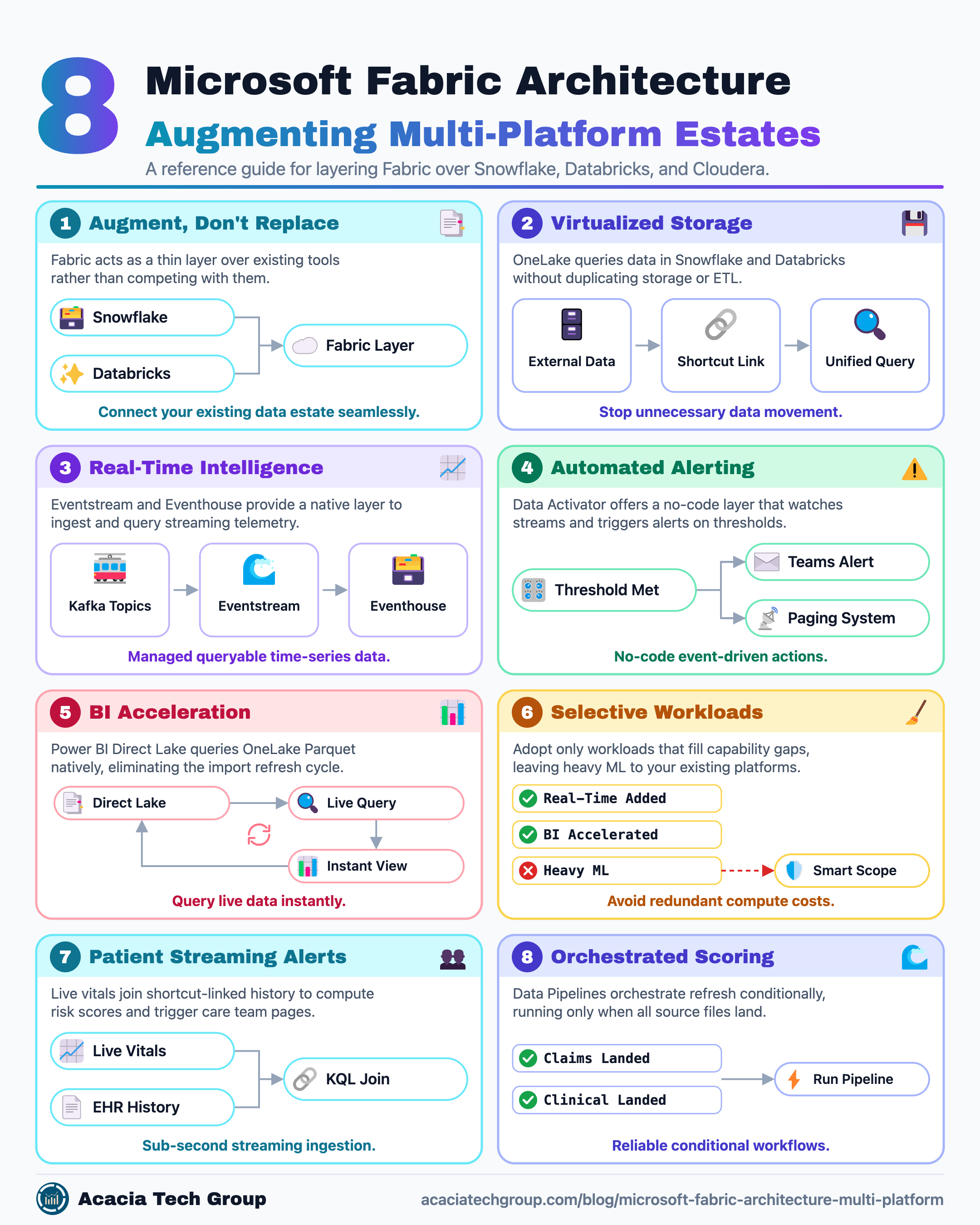
Most enterprises evaluating Fabric are not starting from a blank slate — they already have a warehouse (Snowflake), a Hadoop-era platform carrying real-time messaging (Cloudera + Kafka), a Spark engine for heavy transformation and ML (Databricks), and Azure as the underlying cloud. Most architects mistakenly treat Fabric as a replacement for all of it. It isn't. A modern Microsoft Fabric architecture in this context focuses on its value in three places:
A shared virtual storage layer (OneLake) that lets Fabric query data sitting in Snowflake, Databricks, and ADLS without copying it, via OneLake shortcuts and mirroring.
A native, managed real-time layer (Eventstream, Eventhouse, Data Activator) that neither Snowflake nor Cloudera nor Databricks gives you out of the box.
A BI acceleration layer (Power BI Direct Lake) that removes the import/refresh cycle between your existing platforms and your reports.
Everything else — ingestion orchestration, Spark transformation, SQL warehousing — you likely already own. The Microsoft Fabric architecture described below treats Fabric as a thin, purpose-built layer on top of a multi-platform data estate, not a fifth platform competing with the other four.
Introduction: The Seven Fabric Workloads
Fabric organizes its tools into seven purpose-built workloads, all sharing the same underlying storage layer (OneLake). Before getting into the healthcare data architecture and telecom data strategy scenarios, here's what each one does:
Data Factory — Ingestion and orchestration, via two tools: Dataflow Gen2, a low-code, Power Query-style interface built for business and data analysts; and Data Pipelines, which support conditional, rule-based orchestration (e.g., "run only if all files are present") for data engineers.
Data Engineering — Centers on the Lakehouse, Fabric's storage option for structured and unstructured data. Developers work against it primarily through notebooks and PySpark; SQL can read a Lakehouse but not write to it.
Data Warehouse — Centers on the Synapse Data Warehouse, Fabric's other storage option. Unlike a Lakehouse, a Warehouse supports full transactional SQL — both read and write. Underneath, it's still Parquet files in OneLake, so Spark and SQL users work against the same physical data.
Data Science — Notebooks, MLflow-compatible experiment tracking, AutoML, and a model registry, scoped to data already sitting in OneLake — for modeling work that doesn't need a dedicated ML platform.
Real-Time Intelligence — Eventstream for ingesting streaming sources (including Kafka topics) and Eventhouse (a KQL database) for storing and querying that data as time series, purpose-built for telemetry, logs, and IoT.
Power BI — Reporting and semantic modeling, including Direct Lake mode, which queries OneLake Parquet directly without an import or refresh cycle.
Data Activator — A no-code, event-driven layer that watches a data stream or a Power BI visual for a defined condition and triggers an action (an alert, a ticket, a Teams message) when that condition is met.
The rest of this article assumes you already have Snowflake, Cloudera (with Kafka), Databricks, and Azure in place, and focuses on where these seven workloads add real value to a multi-platform data estate rather than duplicate it.
Overall Reference Architecture
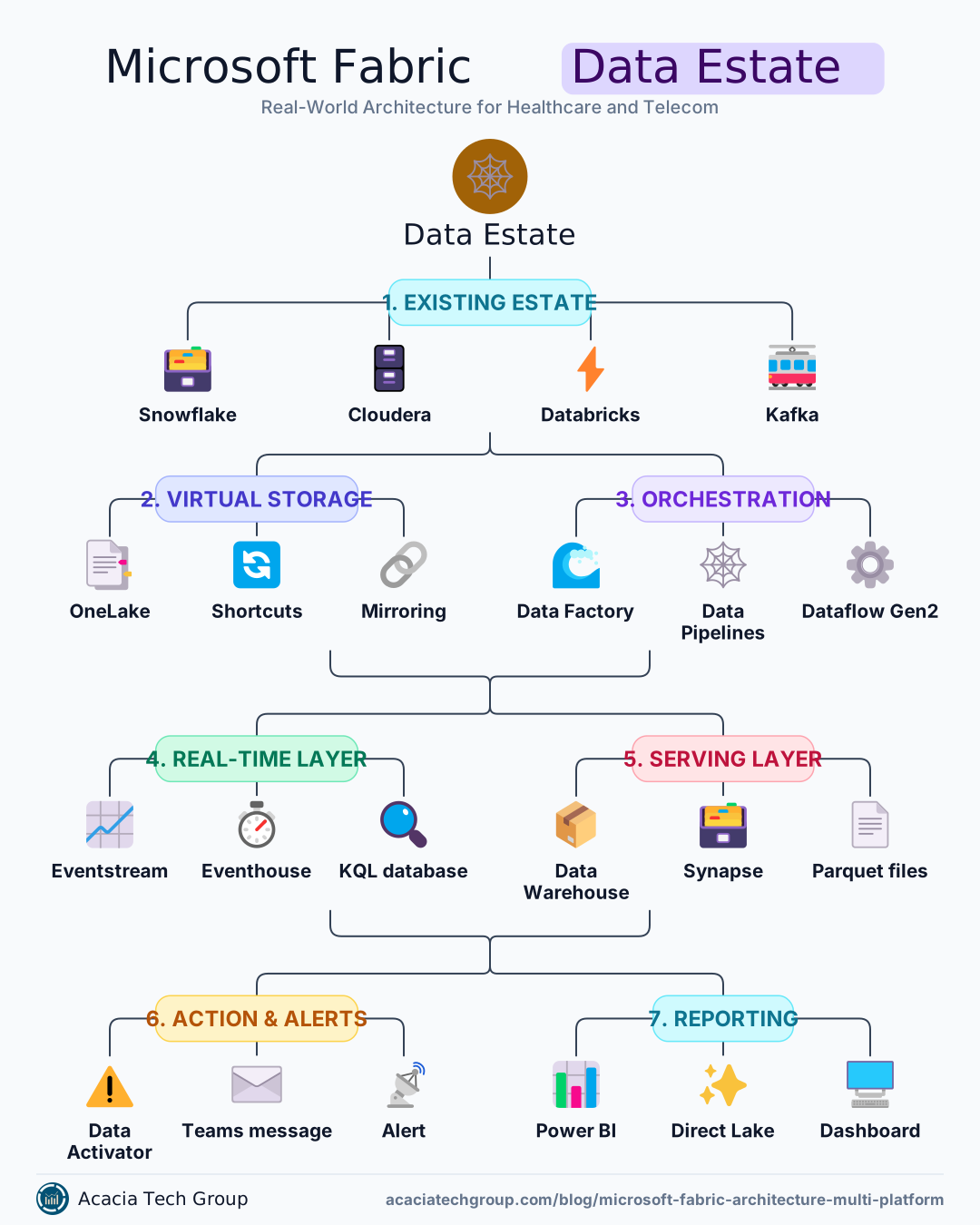
How to read this: Kafka (already running under Cloudera) is the streaming backbone for both industries. Fabric's Eventstream attaches to existing Kafka topics as a source — no new message bus is introduced. Snowflake and Databricks remain systems of record for curated and modeled data; the Microsoft Fabric architecture connects to them via OneLake shortcuts rather than pipelines that copy data. Fabric's own footprint is narrow and deliberate: real-time processing, a thin serving warehouse, orchestration where needed, alerting, and reporting.
Workload-to-Component Mapping
Fabric Workload | Role in This Architecture | Why It's Here, Not Elsewhere |
|---|---|---|
Real-Time Intelligence (Eventstream, Eventhouse) | Ingests Kafka topics, stores and queries time-series telemetry with KQL | Cloudera has Kafka but no managed, queryable time-series store; Snowflake and Databricks streaming require you to build the querying layer yourself |
Data Activator | Watches Eventhouse and Power BI for threshold breaches, fires alerts/actions | No equivalent no-code trigger layer exists natively in Snowflake, Cloudera, or Databricks |
OneLake (shortcuts/mirroring) | Virtualizes Snowflake tables and Databricks Unity Catalog tables into Fabric without copying | Avoids duplicating storage/ETL that Snowflake and Databricks already do well |
Data Warehouse | Thin serving layer for blended, scored, or Fabric-native data (e.g., model output joined to shortcut data) | Not a Snowflake replacement — only holds what needs to sit next to real-time or Power BI data. |
Data Factory | Orchestrates conditional refresh (e.g., "run only if all claims files landed") | Used narrowly, where Fabric-native jobs need scheduling; heavy ETL stays in existing ADF/Databricks jobs. |
Data Science | Not used here | Databricks already owns model training; duplicating this in Fabric adds no value.e |
Data Engineering (Lakehouse) | Not used here | Databricks Spark already covers this; Fabric Lakehouse would be redundant compute |
Power BI | Direct Lake reporting over the Fabric Warehouse and Eventhouse | Existing incumbent, now querying live data without import cycles |
Healthcare Scenario 1: Real-Time Patient Deterioration Alerting
Problem: A hospital system wants to catch early signs of patient deterioration (e.g., sepsis, cardiac events) faster than nurse-driven manual scoring allows, while also factoring in a patient's chronic condition history.
Healthcare Data Architecture Flow:
Bedside monitors stream vitals (heart rate, blood pressure, SpO2, respiration) into Kafka topics on the existing Cloudera cluster — this is unchanged.
Fabric Eventstream connects to those Kafka topics and lands the data in an Eventhouse, queryable in near real time via KQL.
A OneLake shortcut exposes the patient's chronic condition and medication history, which already lives in Snowflake as part of the enterprise EHR analytics warehouse—no data is copied.
A KQL query joins live vitals against the shortcut-linked risk factors to compute a rolling early-warning score.
Data Activator watches that score and fires a Teams/paging alert to the assigned care team the moment a patient crosses a defined threshold, with the triggering vitals attached.
A Power BI Direct Lake dashboard gives charge nurses a floor-wide view, refreshed continuously rather than on a batch cycle.
Why Fabric here and not elsewhere: Cloudera has no native way to serve this as low-latency queryable data with built-in alerting. Snowflake isn't built for sub-second streaming ingestion or time-series pattern matching. This is the clearest case of a Microsoft Fabric architecture filling a real capability gap in a multi-platform data estate rather than duplicating one.
Healthcare Scenario 2: 30-Day Readmission Risk for Value-Based Care Reporting
Problem: A population health team needs a weekly readmission-risk report blending claims data, clinical data, and a predictive model, delivered reliably to care managers — but only once all source files for the week have landed.
Flow:
Claims and clinical extract files arrive weekly from multiple payer and EHR sources into existing Snowflake staging tables.
Databricks runs the feature engineering and trains/scores the 30-day readmission risk model against that data (unchanged from today).
Scored predictions are written to a Fabric Warehouse table, which also shortcuts in claims dimensions from Snowflake for context, avoiding a second full copy of claims data.
A Fabric Data Pipeline (mirroring the "run only if all files are present" pattern) checks for completeness of the week's claims files before triggering the refresh of the reporting layer — this is the same dependency-gated orchestration pattern common in Data Factory pipelines.
Power BI, in Direct Lake mode against the Fabric Warehouse, gives care managers a single risk-stratified view without waiting on a nightly import.
Why Fabric here and not elsewhere: The heavy lifting (feature engineering, model training) correctly stays in Databricks. Fabric's role is narrow: gate the refresh on data completeness, blend model output with warehouse context without duplicating Snowflake's data, and serve it to Power BI faster than an import-based refresh would.
Telecom Scenario 1: Cell Tower Anomaly Detection and Automated Ticketing
Problem: A telecom operator wants to detect degrading cell tower performance (rising dropped-call rate, latency spikes) and open a service ticket automatically before customers start calling in, rather than relying on scheduled network health reports.
Flow:
Call detail records and tower health metrics already stream into Kafka topics on the Cloudera cluster.
Fabric Eventstream ingests those topics into an Eventhouse, giving a continuously queryable time-series store of per-tower metrics.
KQL queries compute rolling dropped-call-rate and latency baselines per tower, refreshed continuously.
Data Activator monitors those metrics and, when a tower's dropped-call rate exceeds a threshold for a sustained window, automatically opens a ServiceNow ticket and notifies the regional NOC team—no polling script or custom Azure Function required.
Historical tower performance (for trend analysis and capacity planning) is shortcut from the existing Cloudera/Hive tables or Snowflake curated layer into OneLake, so a Power BI report can show current anomaly context next to 12 months of trend without moving that historical data anywhere.
Why Fabric here and not elsewhere: This is the same underserved gap as the healthcare vitals scenario — Kafka gives you the stream, but Cloudera doesn't give you managed real-time query-plus-alert tooling. Fabric adds exactly that layer and nothing more.
Telecom Scenario 2: Churn Prediction with Blended Network and Billing Signals
Problem: The retention team wants to flag high-value customers at risk of churn by combining billing/usage history with real-time network experience quality — and alert account managers when a high-value customer's risk score spikes alongside an increase in support tickets.
Flow:
Billing and usage history remain in Snowflake, unchanged.
Real-time network experience data (dropped calls, data throughput per subscriber) lands in the Eventhouse via the same Eventstream-from-Kafka pattern as Scenario 1.
Databricks trains the churn model using a blended feature set pulled via OneLake shortcuts from both Snowflake and the Eventhouse — no data is duplicated into Databricks storage to do this.
Scored churn probabilities are written to the Fabric Warehouse.
Data Activator combines the churn score with a support-ticket volume signal (also shortcut in). It alerts the assigned account manager only when both conditions are met, reducing alert fatigue compared to a single-threshold trigger.
Power BI Direct Lake gives the retention team a live view of at-risk accounts, updated as new network and billing signals arrive.
Why Fabric here and not elsewhere: Model training correctly stays in Databricks — Fabric is not being used as a second ML platform. Fabric's contribution is the compound alerting logic (two signals, one trigger) and the blended, low-latency serving layer that Power BI reads from directly.
Governance Notes for Both Industries
Healthcare (HIPAA): Shortcuts and mirroring do not move PHI out of its system of record, which simplifies the compliance conversation — Snowflake remains the governed source, and Fabric's Purview integration extends lineage and access policy across the shortcut rather than creating a second copy to secure.
Telecom (CPNI and network security): The same shortcut pattern keeps subscriber usage data governed at the Snowflake/Cloudera layer, while Eventhouse data (often less sensitive, telemetry-only) can carry a lighter access policy — worth designing deliberately rather than defaulting to one policy for all Fabric data.
In both cases, Entra ID and Purview provide a single security/lineage plane across the shortcut boundary. Still, a shortcut inherits the source system's row-level security only in limited scenarios, so validate this explicitly rather than assuming it carries over.
What Not to Duplicate
Don't move Databricks Spark transformations or MLflow model training into Fabric Data Engineering or Data Science — you already have this capability, and moving it adds no function, only cost.
Don't stand up Fabric Data Factory pipelines to replace existing Cloudera/Databricks ingestion jobs unless you're consolidating orchestration for governance reasons.
Don't copy Snowflake data into a Fabric Warehouse wholesale — use shortcuts, and only materialize into a Fabric Warehouse table what genuinely needs to sit next to real-time or Power BI-served data.
The organizing principle throughout: Fabric earns its place where your current stack has a real gap — real-time query-plus-alert tooling and Direct Lake reporting — and stays out of the way everywhere your stack already has a strong incumbent.