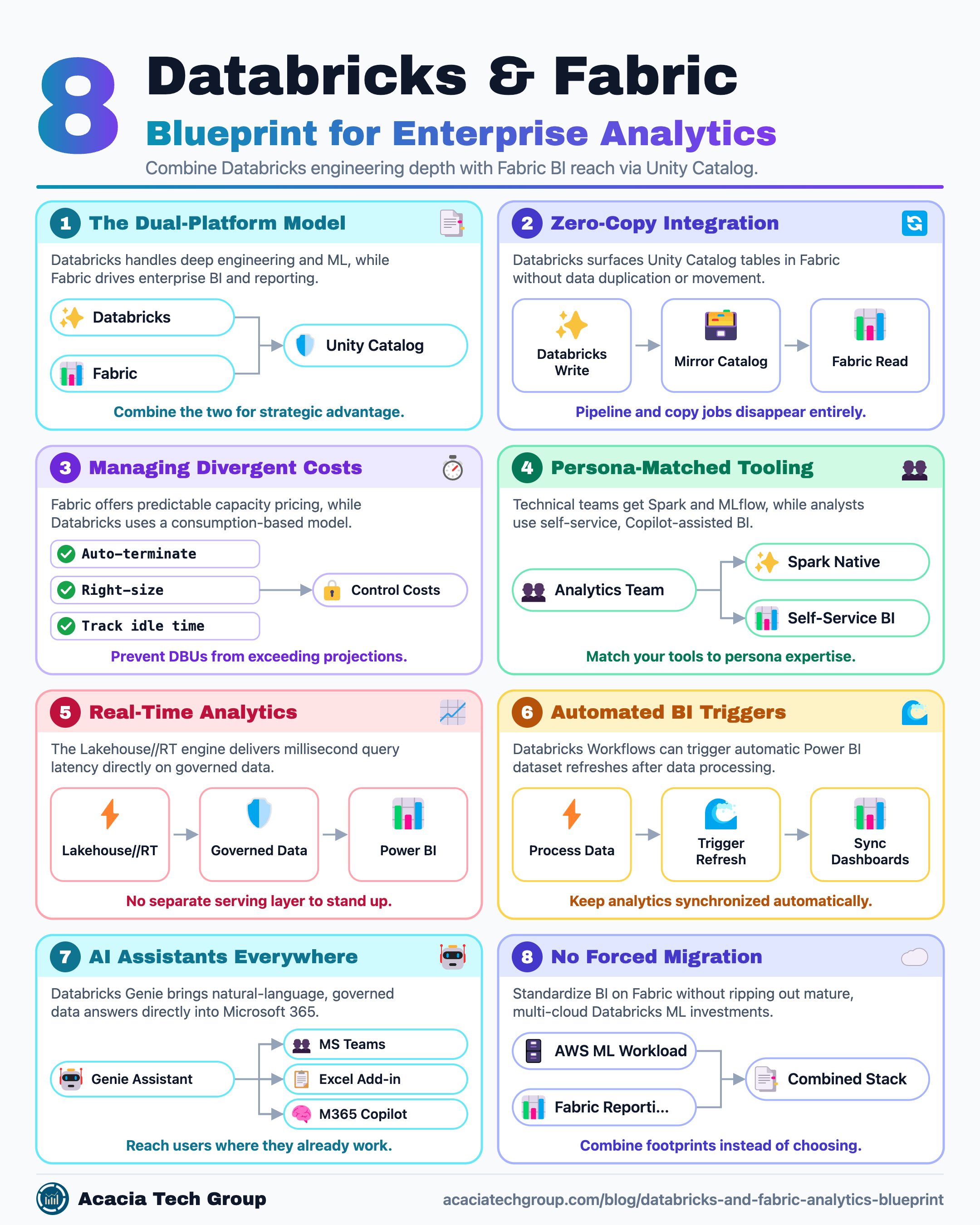
A quick caveat up front: when Databricks and Microsoft Fabric share the same storage, there is a real governance gap you have to design around deliberately. That gap is worth taking seriously — but it shouldn't overshadow the actual point. These two platforms are genuinely worth combining, and a strategic enterprise analytics architecture leverages both. Here is where the Databricks and Fabric combination earns its keep.
A critical pitfall in this dual-platform architecture is the complexity of managing divergent pricing models. While Fabric offers predictable costs through its capacity-based model, Databricks uses a more intricate consumption-based DBU (Databricks Unit) system. Without disciplined auto-termination and right-sizing, Databricks bills routinely exceed projections, so you must monitor idle-time costs, which don't apply to Fabric's bundled capacity units.
Shared storage, zero duplication
Azure Databricks can surface Unity Catalog tables within Fabric without data movement. A "Publish to Fabric" workflow (effectively enabling a Microsoft Fabric Unity Catalog integration) makes those governed tables available across Power BI, SQL analytics, and notebooks as read-only mirrored tables that automatically reflect the source schema and data. Databricks writes once; Fabric reads directly.
For example: a data science team lands a nightly customer_churn_scores table in Unity Catalog. Instead of exporting it to a CSV or standing up a copy job into a Power BI dataset, they publish the catalog to Fabric once. The next morning, the executive Power BI dashboard already reflects the new scores — no pipeline, no duplicate copy to reconcile.
An entire category of "how do we get the model output into the dashboard" pipeline work simply disappears. See Microsoft's own Microsoft Fabric with Azure Databricks overview, the Publish a Unity Catalog catalog to Microsoft Fabric guide, and the Mirroring Azure Databricks Unity Catalog documentation.
Depth where you need it, breadth where you don't
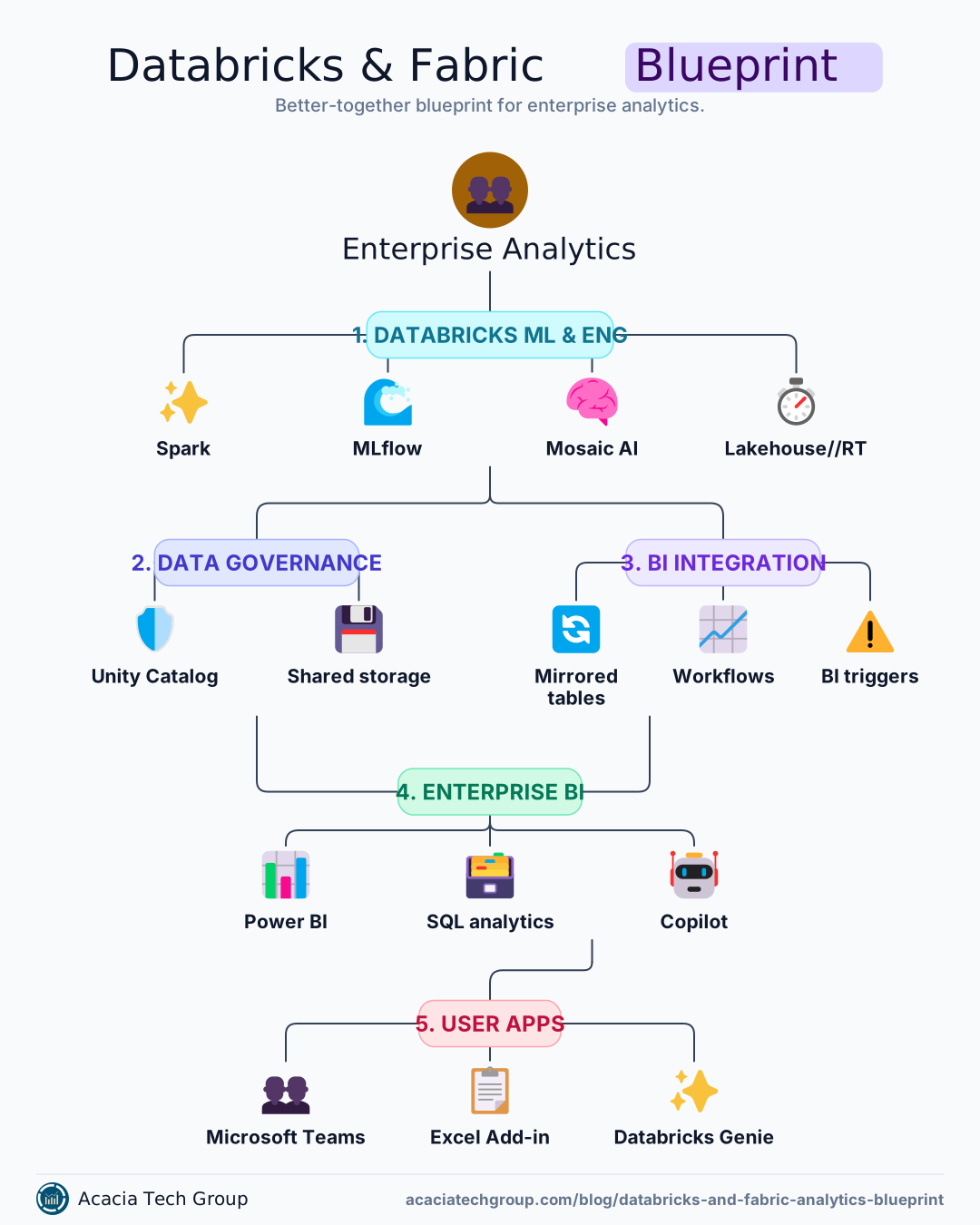
Databricks is built for the technical user: Spark-native engineering, MLflow for full model-lifecycle tracking, Mosaic AI for training and serving, and fine-grained cluster control. Fabric is built for reach: Copilot embedded across the suite, low-code pipelines, and Power BI as a first-class citizen. This approach optimizes the enterprise analytics architecture by matching tools to persona expertise.
For example, a demand-forecasting team trains and version-tracks its model in Databricks using MLflow, tuning Spark clusters for heavy feature-engineering runs. A finance analyst who has never opened a notebook then builds a self-service Power BI report on the published forecast in Fabric, asking Copilot to "show forecast versus actuals by product line." Same numbers, two tools, each matched to the job.
When combined effectively, your ML and data engineering team works at full depth in Databricks. At the same time, business analysts get self-service, Copilot-assisted reporting in Fabric — without forcing either group onto a tool mismatched to their actual job.
The market validation for this split is significant: in the 2026 Data Fabric Survey by BARC, practitioners rated Databricks 8.6/10 for performance and 8.3/10 for both reliability and scalability. A Forrester study also reported a composite 417% ROI over three years for organizations consolidating infrastructure onto the Databricks platform.
Real-time analytics without a bridge to build
Databricks' new Lakehouse//RT engine — powered by a new compute engine, Reyden — delivers lakehouse real-time analytics with millisecond query latency directly on governed data, at high concurrency, with no separate serving layer to stand up. Databricks reports response times as low as ~10ms on smaller datasets and sub-100ms on larger ones, and it connects into Power BI for sub-second reporting.
For example: an operations team scoring transactions for fraud can query the live results at millisecond latency on the lakehouse, while a Power BI operations dashboard in Fabric refreshes sub-second on the same governed tables — no separate real-time serving database to provision, secure, and keep in sync.
You get Databricks' depth for hard real-time computation and Fabric's BI layer for visualization, without building and maintaining a bridge between them. Details are in the introductory blog post and the launch announcement.
Beyond data movement, organizations should focus on automated BI triggers. Using Databricks Workflows, engineers can now add a Power BI task type that automatically refreshes Fabric datasets once data processing is complete, keeping real-time analytics dashboards synchronized without manual refresh schedules.
Your AI assistant shows up where people already work
Using Databricks Genie Microsoft 365 integrations, the natural-language data assistant now reaches users within the Microsoft tools they already use — Microsoft Teams, Microsoft 365 Copilot, and, via the Azure Databricks Excel Add-in, directly in Excel — all governed by Unity Catalog.
For example: a sales manager types "what were our top five products by revenue last week?" into a Teams chat with Genie and gets a governed answer sourced straight from Databricks — without a report request, a BI ticket, or ever opening Databricks. A finance controller does the same from an Excel cell during month-end close.
Business users who never open Databricks still get governed answers over Databricks data from inside the tools they use daily. Databricks describes the broader pattern in Use Genie Everywhere with Enterprise OAuth.
No forced migration off either platform
Databricks runs on AWS, Azure, and GCP, so committing to it for ML doesn't lock you into a single cloud the way fully committing to Fabric would. By integrating Databricks and Fabric, you can standardize BI on Fabric without ripping out a mature Databricks ML investment — and vice versa.
For example: a company standardized on Fabric for BI acquires a business already running Databricks on AWS. Rather than forcing a costly re-platforming, they keep the AWS Databricks ML workloads in place and surface the governed results into their existing Fabric reporting — combining the two footprints instead of choosing between them.
The clear pattern
Heavy ML work and lakehouse real-time analytics belong on Databricks; broad reach, self-service, and deep Microsoft 365 integration belong on Fabric. The governance gap is the one thing you must design around deliberately; everything above follows once you have the right enterprise analytics architecture in place. For the broader trade-off framework, see our enterprise data analytics platform comparison.
When implementing this architecture, we recommend a phased roadmap. Early phases should prioritize "quick wins" with manageable complexity, such as mirroring specific high-value Unity Catalog tables, before tackling more complex governance challenges or multi-cloud integration points.
Where is your organization actually landing on this split today — Databricks-heavy, Fabric-heavy, or genuinely both?
Frequently Asked Questions
Do I have to copy data between Databricks and Fabric?
No. With a Microsoft Fabric Unity Catalog integration, you can publish or mirror tables in Fabric as read-only tables with no data movement, so Fabric reads directly from what Databricks writes.
What is Lakehouse//RT?
Lakehouse//RT is Databricks' real-time engine (powered by Reyden) that delivers millisecond-latency queries at high concurrency directly on governed lakehouse tables, and connects into Power BI for sub-second reporting.
Can business users query Databricks data without learning Databricks?
Yes. The Databricks Genie Microsoft 365 connection brings natural-language, Unity Catalog-governed answers into Microsoft Teams, Microsoft 365 Copilot, and Excel, so users get governed answers without opening Databricks.
Does choosing Databricks lock me into one cloud?
No. Databricks runs on AWS, Azure, and GCP, so you can standardize BI on Fabric while keeping a multi-cloud Databricks ML footprint.
Further reading
Top Approaches to Integrating Azure Databricks with Microsoft Fabric — Detailed technical guide on connectivity methods including OAuth vs Service Principals.
Microsoft Fabric vs. Databricks: 9 key features compared — A deep dive into FinOps considerations and pricing intricacies for both platforms.
Azure Databricks vs Microsoft Fabric: An Honest Guide — A practical decision framework based on your primary data consumer.
Enterprise-Ready Data Architecture Patterns — Reference architectures for building complete platforms using these building blocks.