By Tony Henein — Acacia Tech Group
Agentic AI is having its moment, and for good reason. But there's a big difference between reading about AI agents and actually building one that behaves the way an enterprise needs it to. Over the past few weeks, I built an ai helpdesk agent in Microsoft Copilot Studio from the ground up — persona, guardrails, knowledge base, conversational flows, and human escalation. Here's what I built, how I built it, and the lessons that only show up when you get your hands dirty.
The short version
- Five layers make an enterprise ai agent ready for production: identity (persona + guardrails), grounded knowledge, generative fallback, structured workflows, and human escalation.
- Guardrails aren't restrictions bolted on — they're the agent. An assistant that declines everything outside IT is the one people trust enough to actually use.
- Adding knowledge sources isn't enough. Until you replace the system Fallback topic with a generative answers node, the agent still just apologizes.
- Two quirks cost me real time: Copilot Studio truncates knowledge URLs to their base domain (so use one URL per domain), and trigger phrases have been replaced by description-based triggering.
- The platform is the implementation detail; the architecture is the skill. The same five layers apply whether you build in Copilot Studio, with Claude, or on open source.
The goal
The objective was simple to state and surprisingly nuanced to execute: create an enterprise ai agent that gives employees instant answers to common IT questions — technical issues, company policies, system access — while staying strictly within its lane. No hallucinated answers, no wandering off-topic, no mishandling of sensitive information, and a clean handoff to a human when the agent reaches its limits.
That last sentence is really a design specification in disguise. It translates into five architectural layers: an identity (persona plus enforced guardrails), a curated knowledge base, a generative fallback that puts that knowledge to work, structured workflows for repeatable requests, and an escalation path to a human.
Layer 1: Persona and guardrails
The first thing you configure in Microsoft Copilot Studio isn't a feature — it's an identity. The agent's instructions define who it is (a friendly, professional IT helpdesk assistant), what it must do (base answers only on provided knowledge), and what it must never do (answer non-IT questions, or request and repeat sensitive data like passwords and credentials).
Writing these instructions changed how I think about guardrails. They aren't restrictions bolted onto an agent — they are the agent. A helpdesk assistant that politely declines to discuss dinner recipes isn't limited; it's trustworthy. And in an enterprise setting, trust is the currency that determines whether an AI tool gets adopted or abandoned.
Layer 2: A grounded knowledge base
Next, the ai helpdesk agent needed something to know. I grounded it in two kinds of sources:
- Public websites — four strategic URLs covering the classic helpdesk topics: Windows and Wi-Fi troubleshooting (Microsoft Support), VPN fundamentals (Cloudflare), password guidance (CISA), and remote-work security (NCSC).
- Document knowledge — three official PDF guides from government cybersecurity agencies, covering password best practices, VPN hardening, and mobile device security. These act like internal IT documentation: deeper, curated, and authoritative.
Lesson learned #1: Copilot Studio truncates website URLs to their base path when indexing. Add two pages from the same domain and the second registers as a duplicate. The fix: source each knowledge entry from a distinct domain. It's a small quirk, but exactly the kind of implementation detail that separates a demo from a deployment.
Layer 3: Generative fallback — activating the knowledge
Here's something that surprises most first-time builders: adding knowledge sources doesn't automatically mean the agent uses them everywhere. Out of the box, when no topic matches a user's question, the agent just apologizes.
The fix lives in the system Fallback topic. I replaced the default "I'm sorry" message with a generative answers node that passes the user's question directly to the knowledge base. Now, any question that doesn't match a scripted topic still gets a grounded, cited answer — and the difference in user experience is night and day.
Under the hood, this is retrieval-augmented generation (rag): the agent retrieves relevant content from its curated corpus and generates an answer anchored to it. Copilot Studio just wraps that pattern in a low-code node. → See how RAG works, step by step
Layer 4: Slot filling — a real conversational workflow
Knowledge answers are reactive. The next step was giving the agent a proactive workflow: a Password Reset Request topic that behaves like a ticket intake process.
The flow recognizes intent from natural phrasings ("I forgot my password," "I'm locked out of my account"), then collects structured data across turns — first the user's employee ID, then the application they're locked out of — storing each in topic-scoped variables. Finally, it confirms the request back using both captured values: "Thank you, tony123. I have logged your request to reset the password for Email."
This pattern is called slot filling, and it's the backbone of every task-oriented conversational agent you've ever used. Seeing the variables carry context across turns — and play back correctly in the confirmation — is the moment the agent stops feeling like a search box and starts feeling like a colleague.
Lesson learned #2: Copilot Studio's newer authoring experience replaced classic trigger-phrase lists with description-based triggering, where the agent decides when a topic applies based on a natural-language description. Platforms evolve under your feet; the underlying concept (intent recognition) stays the same. Learn the concept, and the UI changes become trivia.
Layer 5: Knowing when to hand off
The final piece is humility, engineered. The fallback flow tracks failures, and after three unsuccessful attempts to help, the agent stops retrying and routes the user to a human representative.
This three-strike escalation is my favorite part of the whole build, because it encodes a principle that applies to every agentic system: an agent's value isn't just what it can do — it's how gracefully it behaves when it can't. Users forgive an agent that says "let me connect you with a person." They don't forgive one that loops them into frustration.
→ See the same escalation pattern in an AI support-triage workflow
The bigger picture
Stack the layers together and you get an architecture that generalizes far beyond helpdesks:
| Layer | What it does |
|---|---|
| Identity | Persona and scope, defined in instructions |
| Grounding | Curated knowledge, not open-web guesswork |
| Generative fallback | rag for the long tail of questions |
| Structured workflows | Slot filling for repeatable processes |
| Escalation | Human-in-the-loop by design |
Whether you build it in Copilot Studio, with Claude, or on an open-source stack, this pattern is the same. The platform is the implementation detail; the architecture is the skill.
That's the real takeaway from this build: agentic AI isn't about giving a language model free rein. It's about intentional design — deciding what an enterprise ai agent should know, what it should refuse, and when it should hand the conversation to a human. Get those three decisions right, and you've built something an enterprise can actually trust.
Acacia Tech Group helps organizations design and deploy practical AI solutions. If you're exploring AI agents for your business, reach out — we'd love to talk.
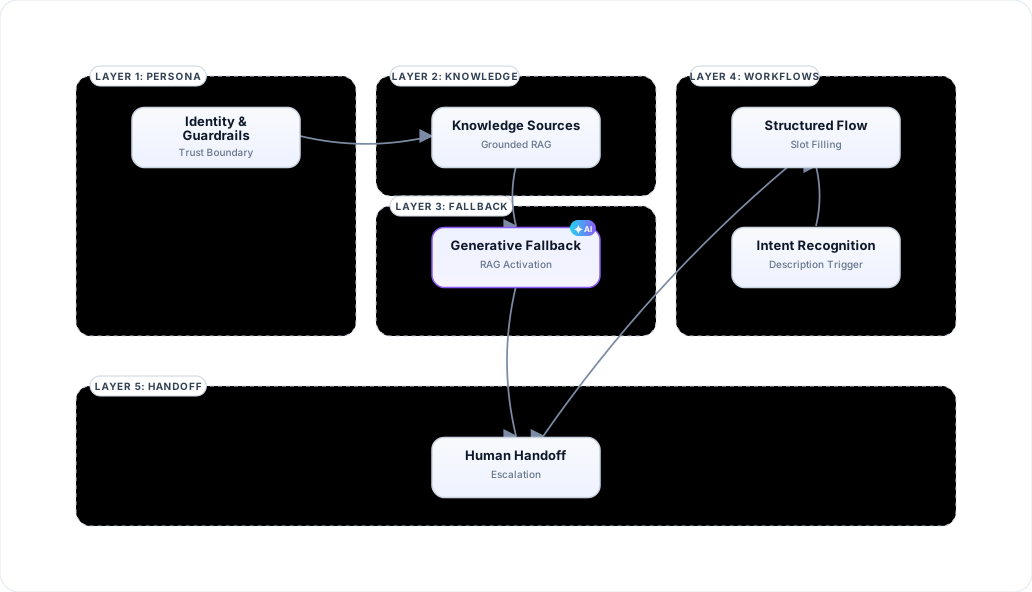
Visualizes the 5-layer architecture of an IT helpdesk agent: Persona, Knowledge, Generative Fallback, Structured Workflows, and Human Escalation.