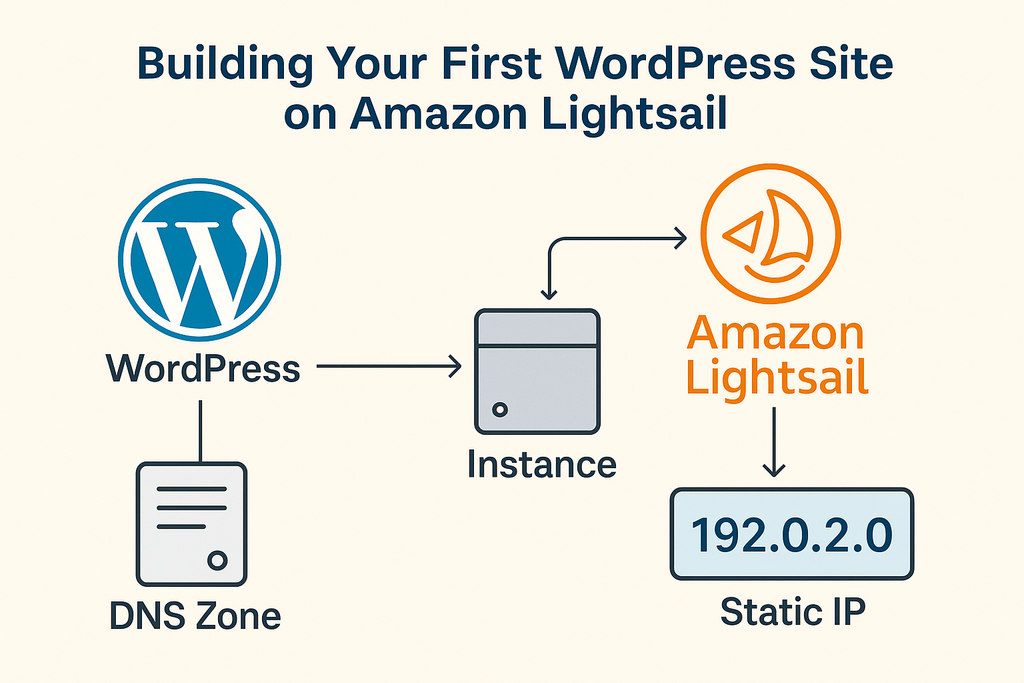
Building Your First WordPress Site on Amazon Lightsail
WordPress powers over 40% of websites globally — from personal blogs to enterprise portals. It’s an open-source content management system (CMS) that simplifies website creation and management. With Amazon Lightsail, you can launch your own WordPress website in just a few clicks, without needing deep technical expertise.
Understanding WordPress
Every business has a website that communicates its mission, services, and story. Major organizations such as NBC, USA Today, Disney, Airbnb, and Spotify use WordPress for its flexibility and ease of use.
Even without coding experience, you can have a professional website running in minutes.
Launched on May 27, 2003, by Matt Mullenweg and Mike Little, WordPress is open source and free to use. It acts as the central repository for all your site’s content — text, images, videos, and documents — allowing you to edit, publish, and manage pages seamlessly.
Core Features of WordPress
1. User Management
WordPress lets you assign user roles such as Subscriber, Contributor, Author, Editor, and Administrator. This ensures secure and structured collaboration among multiple users.
2. Media Library
A built-in media library makes it simple to upload and manage files — including images (JPEG, PNG, GIF, BMP), audio (MP3, WAV, OGG), video (MP4, MOV, WMV), and documents (PDF, DOC, PPT).
WordPress automatically organizes files and allows quick resizing or embedding within posts and pages.
3. Theme System
Themes define the look and feel of your site. Each theme is a set of template files — HTML, CSS, and PHP — that control layout and design. WordPress includes several default themes, such as Twenty Twenty-Two, the first block-based theme that simplifies customization.
4. Plugins
Plugins extend functionality, from SEO optimization to e-commerce. Examples include WooCommerce (for online stores) and Jetpack (for analytics and security).
A plugin is essentially a mini-application that enhances your site — but using too many can slow performance.
5. Search Engine Optimization (SEO)
WordPress supports powerful SEO tools. Plugins like Yoast, Rank Math, and The SEO Framework help improve site rankings.
Search engine visibility can be managed under Settings → Reading, and new sites typically appear in search results within 4–6 weeks.

6. Multilingual Support
Creating a multilingual website broadens your audience and improves SEO.
Plugins like Weglot and Polylang simplify translation and localization, ensuring all meta titles, descriptions, and alt text are properly adapted.
7. Importers
WordPress offers built-in import/export tools for moving content between sites. From the dashboard, go to Tools → Export to download an XML file, then import it into another site using the WordPress Importer.

Benefits of Using WordPress
- Free and open-source with thousands of themes and plugins
- Easy content editing and media uploads
- Multiple SEO optimization tools available
- No PHP expertise required for general site management
Drawbacks of Using WordPress
- Advanced customization requires HTML, CSS, and PHP knowledge
- Heavy reliance on third-party themes and plugins
- Requires consistent updates to maintain performance and security
Getting Started: WordPress on Amazon Lightsail
One of the easiest ways to deploy WordPress is by using Amazon Lightsail, AWS’s streamlined cloud hosting platform.
Step 1: Create an AWS Account
Sign up for an AWS account and access the Lightsail console.
Step 2: Create a WordPress Instance
Select Linux/Unix as the platform and choose the WordPress blueprint. Lightsail will automatically handle provisioning and configuration.
Step 3: Assign a Static IP
Attach a static IP address to your instance. This ensures your website’s IP remains the same even if the instance restarts.
Step 4: Configure Your Domain
Register your domain and link it through Lightsail’s DNS zone. This maps your custom domain to your WordPress instance.
Step 5: Access the Admin Dashboard
Retrieve your default WordPress admin password from the instance management page. Then navigate to http://your-static-ip/wp-admin to log in.
Summary
WordPress remains the most versatile CMS available — intuitive for beginners and extensible for developers.
By deploying WordPress on Amazon Lightsail, you gain an affordable, scalable, and easily managed environment to launch professional websites in minutes.