
How to Treat State When Building Agentic AI
Most people building their first agent think about the model, the tools, and maybe the prompt. State — what the agent remembers, for how long, and why — usually gets treated as an afterthought. That's a mistake. State isn't an implementation detail bolted onto an otherwise "smart" agent; it's a primary design surface when building agentic AI. Get it wrong and the agent looks unreliable even when the underlying model is excellent. Get it right and even a modest model can carry off a genuinely complex, multi-step task.
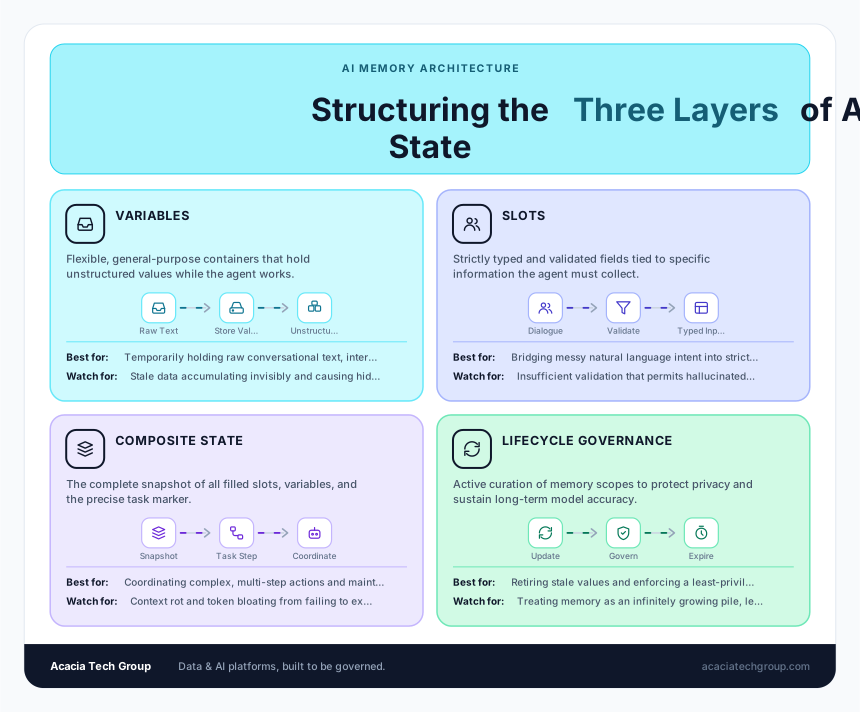
Here's a practical breakdown of how to think about ai agent state management, drawn from three layers that show up in almost every agent framework: variables, slots, and state itself.
The three layers
Variables are general-purpose containers — strings, numbers, objects — that hold values while the agent works. They're flexible but unstructured.
Slots are typed, validated fields tied to specific pieces of information the agent needs: a date, a name, an order number. Slot filling is the bridge between messy conversational language and the structured input a tool or workflow actually needs. Copilot Studio state is a good real-world example of this pattern — it uses entities to identify and extract information from a conversation and store it in variables, with explicit scoping (topic, global, system, environment) that determines where a piece of state lives and who can see it.¹
State is the composite snapshot — all the filled slots and variables, plus a marker for where the agent is in the task. Think of it this way: variables give you flexibility, slots give you reliability, and state gives you coordination across turns and tools.
Treat state as a lifecycle, not a pile
The biggest practical mistake is treating state as something that only grows. A well-designed agent creates state deliberately, updates it incrementally (so you can trace what changed, when, and why), and — critically — retires it. Clearing isn't just deletion; it can mean marking a value as stale, resetting confidence, or forcing revalidation before reuse. Explicit clearing on completion, cancellation, or error prevents "contamination," where leftover context from a finished task quietly biases the next one.
This maps directly onto what Anthropic calls context engineering — the discipline of curating the limited set of tokens an LLM sees at any given moment, rather than letting context accumulate indefinitely. Anthropic frames it as finding "the smallest set of high-signal tokens that maximize the likelihood of your desired outcome," using techniques like writing state out to external memory, selecting only what's relevant to the current step, compressing older history, and isolating context between subtasks.² This isn't a nice-to-have — research on "context rot" shows that model accuracy at recalling specific details degrades as more tokens pile into the window, well before you hit any hard token limit.³
Scope everything on purpose
A good habit, whether you're in a low-code tool like Copilot Studio or building an agent from scratch: for every piece of state, be able to answer why it lives at this scope and for how long. Is it topic-scoped (needed only for this subtask), global (needed across the whole session), or does it need to persist beyond the session entirely? Mixing these without discipline is exactly what produces the "why did the agent forget/remember that" bugs that are hardest to debug.⁴
Treat memory as a risk, not just a feature
The more an agent remembers, the more you have to govern. Stale variables reused across sessions, unvalidated slots driving the wrong tool call, and missing state resets are recurring root causes of agent failure — they just look like "the model messed up." Efficient llm memory design dictates that state also carries real privacy and security weight: encryption in transit and at rest, access controls, and retention limits aren't optional extras once state includes identifiers or transaction details. A reasonable default is least privilege applied to memory itself — the agent keeps only what it needs to finish the task or honor a stated preference, and defaults to forgetting everything else.
The questions worth asking before you ship
Whenever you're designing or reviewing an agent's state handling, it's worth running through:
- What does the agent remember, and why?
- For how long?
- Under what controls (who can access it, is it encrypted, is it scoped correctly)?
- How does it recover when memory turns out to be wrong or stale?
Those four questions are usually what separates a prototype that works in a demo from a system that holds up in production.
Worked examples
It helps to see these ideas in concrete form. A few examples for each point above — including a couple pulled straight from a Copilot Studio Helpdesk Agent build:
Variables vs. slots vs. state
- Variable: a raw string holding whatever the user just typed —
lastUserMessage = "I forgot my password"— unstructured, just a container. - Slot: that same input run through extraction and validation into a typed field, like
employeeID(must match a number pattern) orrequestDate(must resolve to a valid date). This is what slot filling via Question nodes looks like in practice — two typed, topic-scoped variables instead of raw text. - State: the full snapshot —
{employeeID: "48213", requestConfirmed: true, currentStep: "awaiting_email_verification"}— that tells the agent both what it has collected and where it is in the flow.
Lifecycle management
- Incremental update with provenance: an e-commerce agent updates
shippingAddressonly when the user explicitly confirms a new one, logging "changed by user confirmation, turn 14" — so it's traceable later why the value is what it is, rather than a silent overwrite. - Explicit clearing on completion: a "Clear all variables" node run on conversation reset. Without it, a
Global.OrderNumberleft over from a finished order could bleed into a brand-new unrelated request and cause the agent to reference the wrong order. - Time-based expiry: a travel-booking agent holds a
selectedFlightslot for 15 minutes to match an airline's fare-hold window, then invalidates it and re-checks price and availability instead of trusting a now-stale assumption.
Scoping deliberately
- Topic-scoped:
appointmentDatecollected inside a "Schedule Appointment" topic — no other topic needs it, so keeping it local avoids accidental reuse. - Global:
userAuthenticated(Boolean) — needed by nearly every topic to decide whether privileged actions are allowed, so promoting it to global scope makes sense. - System:
{user.email}— auto-populated by the platform, available everywhere, never hand-managed. - Scoping mistake: if
OrderRequestis left topic-scoped but a different topic tries to reference it, the platform simply can't see it — a classic "why isn't this working" bug that's actually a scoping error, not a logic bug.
State as a risk multiplier
- Stale state causing wrong behavior: an agent caches a user's "Premium" support tier at session start, but the user downgrades mid-conversation — the agent keeps offering priority routing it should no longer offer.
- Least privilege applied to memory: a healthcare intake agent captures
symptomDescriptionto route the conversation, but is explicitly designed not to retain it beyond the session once triage is complete, because it doesn't need to for future turns. - Recovery from bad state: instead of restarting the whole conversation when a slot value turns out to be invalid, the agent asks one targeted clarifying question — "Can you confirm your employee ID again?" — resumability instead of a full reset.
Sources